
Security in Mobile: 2026 Enterprise Defense Guide

Security in mobile is defined as the comprehensive protection of mobile devices, applications, data, and users from threats including malware, spyware, and social engineering attacks. For IT professionals managing enterprise fleets in 2026, this means contending with increasingly sophisticated attack vectors on both iOS and Android platforms. Standards like OWASP MASVS and MASTG provide the verification frameworks security teams need, while platform advances such as Android Live Threat Detection and Apple Lockdown Mode raise the technical floor for device-level defense. Social engineering attacks, particularly smishing and vishing, remain the most operationally damaging threat category because they bypass technical controls entirely by targeting users directly.
What are the main threats to mobile device security in 2026?
Mobile threat actors in 2026 operate across multiple attack surfaces simultaneously, combining technical exploits with social manipulation to maximize their success rate. Understanding the threat taxonomy is the prerequisite for building any effective mobile security program.
Social engineering on mobile encompasses phishing via email, smishing via SMS, vishing via voice calls, and fake app notifications that impersonate trusted services. Each vector exploits user trust rather than technical vulnerabilities, which is why they succeed even on fully patched devices. Attackers craft messages that create urgency, impersonate executives or financial institutions, and direct users to credential-harvesting pages that are visually indistinguishable from legitimate login screens.
Advanced spyware represents the high-sophistication end of the threat spectrum. Strains like LANDFALL exploit zero-click vulnerabilities, meaning the target does not need to interact with any malicious content for compromise to occur. This category of threat is particularly relevant for security teams protecting executives, legal counsel, and other high-value targets who handle sensitive organizational data on personal or corporate devices.
Physical device compromise and rooted or jailbroken devices create additional risk surfaces. When a device’s integrity is broken, kernel-level protections are removed and inter-process communication (IPC) mechanisms become exploitable. Attackers who gain physical access to an unlocked device can extract credentials, session tokens, and locally cached data within minutes.
The most dangerous mobile threats in 2026 combine social engineering at the user layer with technical exploits at the OS layer. Defending against one without the other leaves a critical gap in enterprise mobile security posture.
Key threat categories IT teams must account for:
- Smishing and vishing campaigns targeting employees with payroll fraud, gift card scams, and executive impersonation
- Zero-click spyware exploiting unpatched vulnerabilities without user interaction
- Malicious app sideloading on Android devices with disabled Play Protect
- IPC abuse on rooted or jailbroken devices to intercept app data
- OTP interception via malicious apps granted SMS read permissions
How do modern mobile platforms enhance security against social engineering and spyware?
Both Android and iOS have shipped significant security capabilities in 2026, moving beyond reactive patching toward proactive, AI-assisted threat detection. The gap between a default device configuration and a hardened one has never been wider, which means IT teams that ignore platform-native controls are leaving substantial defensive capability unused.
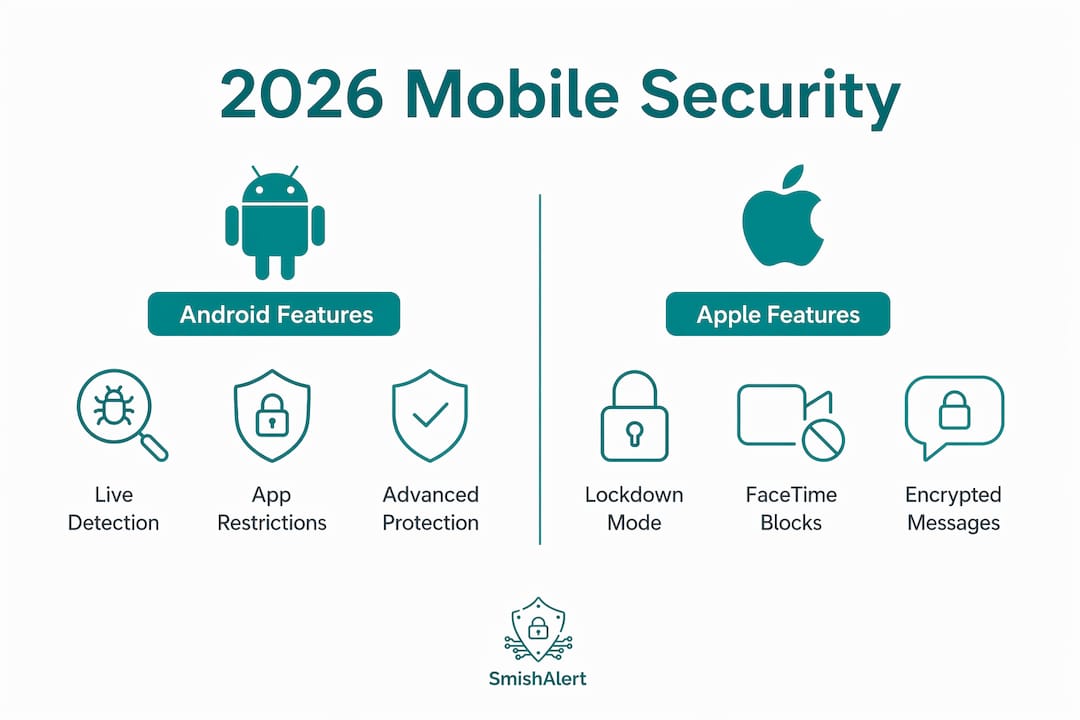
Android’s 2026 security architecture
Android’s 2026 security features include Live Threat Detection, which uses on-device AI to analyze app behavior in real time and flag anomalous activity without sending data to Google’s servers. Advanced Protection mode adds USB protection on Pixel devices running Android 16 and later, blocking data transfer over USB when the device is locked. Intrusion Logging, supported in the Android 16 December update, creates tamper-resistant forensic records that security teams can use during incident response. Android now hides OTP codes from most apps for three hours after receipt, directly reducing the risk of OTP theft by malicious apps with SMS read permissions.

Apple’s Lockdown Mode
Apple’s Lockdown Mode blocks advanced spyware attack vectors by restricting incoming FaceTime calls from unknown contacts, disabling certain web technologies in Safari, and cutting 2G and 3G connections that are frequently exploited in IMSI-catcher attacks. It is opt-in and proven effective against NSO Group’s Pegasus spyware, making it the appropriate recommendation for high-risk individuals within an organization. The operational trade-off is reduced functionality, which is why it is not a blanket enterprise policy but a targeted control for specific user segments.
Platform comparison: hardened modes
| Feature | Android Advanced Protection | Apple Lockdown Mode |
|---|---|---|
| App installation restrictions | Blocks sideloading, enforces Play Protect | Blocks unknown app profiles |
| Network hardening | Blocks 2G connections | Blocks 2G/3G connections |
| USB protection | Blocks data transfer when locked (Pixel, Android 16+) | Restricts wired connections |
| Forensic logging | Intrusion Logging (tamper-resistant) | Limited native logging |
| Spyware defense | Memory Tagging Extension, scam detection | Proven against Pegasus |
| Opt-in required | Yes | Yes |
Industry trends confirm increasing adoption of these opt-in hardened modes as core risk mitigations for targeted attack scenarios. Security teams should document which user segments qualify for each mode and build enrollment into their device provisioning workflows.
Pro Tip: Deploy Android Advanced Protection and Apple Lockdown Mode as standard policy for any employee with access to financial systems, M&A data, or executive communications. The functionality trade-offs are manageable; a spyware compromise is not.
What best practices and industry standards guide mobile security programs?
Effective mobile security program best practices are grounded in two authoritative frameworks: OWASP MASVS for defining security requirements and MASTG for verifying that those requirements are met. Together, they provide a testable, repeatable methodology that security teams can apply to both internally developed and third-party mobile applications.
MASVS organizes requirements into categories covering storage, cryptography, authentication, network communication, platform interaction, code quality, resilience, and privacy. Each category produces pass/fail criteria that map directly to testable controls. MASTG then provides the specific test procedures for iOS and Android, supporting both white-box testing with source code access and black-box testing against compiled binaries.
Microsoft Intune configuration levels for Android Enterprise
Microsoft Intune’s 2026 guidance defines three security configuration levels for Android Enterprise fully managed devices, aligned with Zero Trust principles:
- Level 1 (Baseline): Enforces password complexity, device encryption, and basic compliance policies. Appropriate for standard corporate devices with limited data access.
- Level 2 (Enhanced): Adds stronger password requirements, restrictions on app installation sources, and expanded compliance rules. Recommended for devices accessing corporate email and productivity data.
- Level 3 (High Security): Enforces strict compliance, integrates Microsoft Defender for Endpoint as the Mobile Threat Defense (MTD) solution, and blocks non-compliant devices from accessing corporate resources. Required for devices handling sensitive or regulated data.
This tiered model aligns with Zero Trust security principles, where device health is continuously verified rather than assumed at enrollment.
Critical technical controls
Security teams should treat the following controls as non-negotiable baselines for any mobile security program:
- Strong authentication: Enforce biometric or hardware-backed PIN authentication with short lock timeouts
- Encryption: Require full-disk encryption on all managed devices; verify compliance via MDM policy
- TLS and certificate pinning: All app-to-server communication must use TLS 1.3 with certificate pinning to prevent man-in-the-middle interception
- Root and jailbreak detection: Root detection raises attacker cost but is not an absolute boundary; treat it as one layer in a defense-in-depth architecture, not a standalone control
- Server-side authorization: Mobile app hardening requires backend enforcement of all access decisions; client-side role checks are bypassable via reverse engineering and runtime instrumentation
Pro Tip: When testing mobile app security controls using MASVS/MASTG, document whether each test is conducted white-box or black-box. Mixed-mode testing produces the most complete picture of actual attacker capability against your application.
How can organizations effectively mitigate mobile social engineering risks?
Mitigating social engineering on mobile requires layering controls across the user, application, and infrastructure layers. No single control is sufficient because attackers adapt their tactics to whatever gap exists in the defense stack.
User education programs focused on recognizing phishing, smishing, and vishing are the foundational control. Training must go beyond annual awareness modules. Effective programs simulate real attack scenarios, including fake SMS messages impersonating IT helpdesks and voice calls requesting MFA code confirmation. Employees who have experienced a simulated attack are measurably better at identifying real ones.
The following sequence represents the recommended implementation order for a mobile social engineering defense program:
- Deploy SMS and email filtering at the gateway level to block known malicious domains, URLs, and sender patterns before messages reach employee devices. Solutions integrated with threat intelligence feeds update block lists continuously.
- Enforce phishing-resistant MFA across all corporate applications. FIDO2 hardware keys and passkeys eliminate the OTP interception risk entirely because the authentication credential is bound to the legitimate domain.
- Implement app shielding on internally developed mobile applications. Runtime Application Self-Protection (RASP) detects and blocks suspicious behavior such as hooking frameworks, debugger attachment, and emulator execution.
- Harden approval and identity-change workflows. Enterprise social engineering defenses must include enhanced controls at account recovery and MFA modification moments, which are the points where attackers most frequently succeed after initial social engineering contact.
- Integrate Mobile Threat Defense with your SIEM and IAM platforms. Microsoft Defender for Endpoint on mobile, for example, feeds device risk signals into Conditional Access policies, blocking compromised devices from accessing corporate resources in real time.
- Audit sensitive change workflows continuously. Any process that allows modification of payroll data, wire transfer instructions, or administrative credentials via mobile should require out-of-band verification.
Pro Tip: Treat smishing as a gateway threat, not an endpoint threat. A successful smishing message that harvests credentials can escalate into broader network compromise within hours. Detection at the messaging layer is faster and cheaper than remediation after lateral movement.
Key takeaways
Effective security in mobile requires combining platform-native controls, verified application security standards, and layered social engineering defenses rather than relying on any single tool or policy.
| Point | Details |
|---|---|
| Platform hardening is underutilized | Android Advanced Protection and Apple Lockdown Mode provide proven spyware defense but require deliberate enrollment policies. |
| MASVS/MASTG sets the standard | Use OWASP MASVS categories and MASTG test procedures to verify mobile app security controls systematically. |
| Server-side enforcement is non-negotiable | Client-side controls are bypassable; all access decisions must be enforced at the backend. |
| Social engineering targets the user layer | SMS filtering, phishing-resistant MFA, and simulated attack training collectively reduce social engineering success rates. |
| Intune tiered levels align with Zero Trust | Microsoft Intune’s three-level Android Enterprise configuration maps device risk to data sensitivity for managed fleets. |
Why the “hostile device” mindset changes everything
After years of reviewing mobile security programs across enterprise environments, the single most consistent failure I see is the assumption that a managed device is a trusted device. It is not. Modern mobile hardening requires treating every mobile client as a potentially adversarial environment, one where the attacker may already control the OS, the file system, or the network path.
This mindset shift has concrete implications. It means moving authorization logic to the server, binding sessions to device attestation signals, and treating anomalous API call patterns as indicators of compromise rather than bugs. It also means accepting that reverse engineering and runtime instrumentation cannot be fully prevented. App shielding raises the cost of analysis; it does not make analysis impossible. Motivated attackers with sufficient resources will eventually get through client-side defenses. The goal is to make the server the last line of defense that actually holds.
The other area I see consistently underinvested is incident response for mobile. Platform features like Android Intrusion Logging and iOS forensic capabilities are only useful if security teams have documented procedures for accessing and interpreting them. Auto-reboot features that reduce the attack window post-compromise are operationally significant because they limit data exfiltration time. Build these into your incident response playbooks before you need them, not after.
Balancing security with user experience is a real constraint, not an excuse. Lockdown Mode is not appropriate for every employee. Mandatory FIDO2 keys create friction in field environments. The answer is risk segmentation: apply the most restrictive controls to the highest-risk users and data, and build enrollment workflows that make adoption as frictionless as possible for everyone else.
— Sophie
Strengthen your mobile defense with SmishAlert
Platform controls and MDM policies address device-level risk, but they provide no visibility into social engineering attacks that arrive via SMS, iMessage, or WhatsApp outside the corporate perimeter. SmishAlert fills that gap directly. Security teams using SmishAlert gain real-time detection of smishing campaigns, executive impersonation attempts, and credential-harvesting messages targeting employees across all major messaging channels. SmishAlert deploys without MDM dependency, making it practical for organizations with mixed device ownership models. For security leaders building a complete mobile security posture, SmishAlert provides the human-layer visibility that technical controls alone cannot deliver. Explore SmishAlert’s capabilities at RSA Conference 2026.
FAQ
What is security in mobile devices?
Security in mobile devices is the practice of protecting smartphones, tablets, and their applications from unauthorized access, malware, and social engineering attacks through technical controls, policy enforcement, and user education. It encompasses device-level protections, application security standards like OWASP MASVS, and organizational policies governing device use and data access.
How does smishing differ from email phishing?
Smishing uses SMS or messaging apps like iMessage and WhatsApp to deliver social engineering attacks, bypassing email security gateways entirely. Because mobile users are conditioned to trust SMS as a channel, smishing via iMessage and similar platforms achieves higher click-through rates than equivalent email phishing campaigns.
What is OWASP MASVS and why does it matter for enterprise mobile security?
OWASP MASVS is the Mobile Application Security Verification Standard, which defines pass/fail security requirements across categories including authentication, cryptography, network communication, and resilience. It gives security teams a structured, testable framework for evaluating mobile app security rather than relying on ad hoc assessments.
Does Apple Lockdown Mode protect against all spyware?
Lockdown Mode significantly reduces the attack surface for advanced spyware by restricting features commonly exploited in zero-click attacks, and it has been proven effective against NSO Group’s Pegasus. It does not provide absolute protection, but it raises the cost of a successful compromise to a level that deters most threat actors except nation-state operators.
How can IT teams deploy mobile phishing protection without full MDM?
Organizations can deploy mobile phishing protection without MDM by using solutions that operate at the user reporting and threat intelligence layer rather than requiring device enrollment. SmishAlert, for example, provides visibility into messaging-based social engineering attacks across employee devices regardless of whether those devices are enrolled in a mobile device management platform.