
Social Engineering via iMessage: What You Need to Know

Most iPhone users assume iMessage is secure because Apple encrypts it end to end. That assumption is exactly what attackers count on. Understanding what is social engineering via iMessage means recognizing that the threat is not technical in origin. It is psychological. Attackers do not need to break Apple’s encryption. They manipulate the person holding the phone. This article explains how these attacks work, what real campaigns look like, how to spot them, and what you can do to stop them before they cause damage.
Table of Contents
Key takeaways
| Point | Details |
|---|---|
| Social engineering targets people, not systems | Attackers exploit trust and urgency in iMessage to extract credentials or access, not encryption weaknesses. |
| The “Reply Y” trick disables your protection | Replying to phishing messages converts unknown senders to trusted contacts, enabling malicious links. |
| Sender branding can be spoofed | A message that looks like it comes from Apple or your bank may not. Always verify through official channels. |
| Technical defenses have limits | Apple’s BlastDoor and link filtering help, but they cannot stop a user who voluntarily interacts with an attacker. |
| Slow verification breaks the attack cycle | Pausing to verify through an official app or website is the single most effective defense against iMessage social engineering. |
What is social engineering via iMessage
Social engineering is the practice of using psychological manipulation rather than technical exploits to gain unauthorized access to information or accounts. Apple defines it as impersonation, deception, and manipulation delivered through communication channels including phone calls and text messaging. The goal is to make the target do something willingly: share a password, click a link, or confirm account details.
When this tactic moves through iMessage, the attack surface expands considerably. iMessage reaches hundreds of millions of active Apple users, and those users have been conditioned to trust the platform. Messages appear in the same thread as texts from family members. Notifications arrive on Apple Watch. The interface feels personal, familiar, and safe.
That familiarity is the exploit. Attackers use iMessage to impersonate trusted entities, including banks, delivery services, Apple itself, and even known contacts. They craft messages that create urgency, trigger fear, or appeal to helpfulness. The psychological pressure is designed to short-circuit rational thinking and push the target toward a fast, unverified response.
Common iMessage social engineering techniques include:
-
Credential-harvesting phishing links disguised as package tracking updates or account alerts
-
Impersonation of known contacts using spoofed names or numbers
-
Urgency-based manipulation such as “Your account will be locked in 24 hours”
-
Authority exploitation where attackers pose as Apple Support or government agencies
-
Link re-enabling tricks that convert the attacker from an unknown sender to a trusted one
Pro Tip: If a message creates immediate pressure to act, treat that pressure itself as a red flag. Legitimate organizations do not demand instant responses through text messages.
Common iMessage social engineering techniques
Knowing the general concept is useful. Knowing the specific playbook attackers use is what actually protects you. Here are the most documented and damaging techniques active in recent campaigns.
The “Reply Y” link re-enabling trick
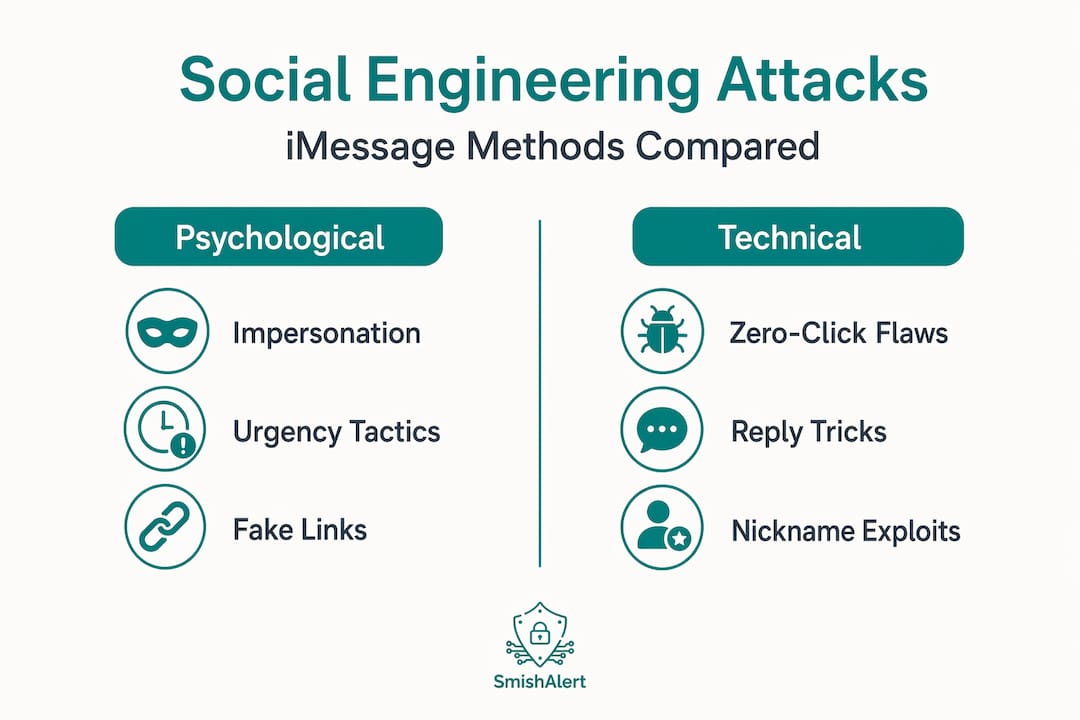
This is currently the most widely reported iMessage social engineering technique. By default, iMessage disables links in messages from unknown senders. The link appears as plain text rather than a tappable URL. Attackers worked around this by instructing recipients to reply with “Y” or “1” to confirm a delivery or unlock an account. Once the user replies, iMessage reclassifies the sender as a known contact. The previously disabled link becomes active, and the credential-harvesting page is one tap away.
What makes this particularly effective is that replying to a text feels like a routine, low-risk action. Confirming appointments, responding to delivery alerts, and replying to service notifications are normal behaviors. Attackers track which targets respond to prioritize probable victims for escalated follow-up attacks.
Impersonation campaigns
Attackers build messages that visually and tonally replicate legitimate company communications. The text may include a company logo reference, a realistic-sounding sender name, and language pulled directly from real notifications. Apple notes that social engineering specifically copies the look and feel of legitimate company communications to create false trust.

In 2025, campaigns impersonating the U.S. Postal Service and major banks circulated widely, directing users to credential-harvesting sites that mirrored official login pages with near-perfect accuracy.
Zero-click and nickname exploits
A more technical variant involves vulnerabilities in iMessage itself. In 2025, a zero-click iMessage flaw was reported that could allow remote attacks without any user interaction through an iMessage nickname exploit. Apple patched the vulnerability and stated it had not been exploited maliciously, but the incident illustrates that even passive receipt of a message can carry risk under certain conditions.
The table below compares the primary attack types by method, user action required, and risk level:
| Attack type | User action required | Primary risk |
|---|---|---|
| Reply Y link trick | Reply to message | Link activation, credential theft |
| Phishing link tap | Tap enabled link | Credential-harvesting site access |
| Impersonation message | Share data or call back | Account takeover, fraud |
| Zero-click exploit | None | Remote code execution |
Pro Tip: Even technically savvy users can fall for iMessage scams because the messages mimic routine interactions. The subtlety of these attacks is by design, not accident.
Identifying social engineering attacks on iMessage
Recognizing an attack before you interact with it is the most reliable form of defense. Several consistent patterns appear across iMessage phishing campaigns.
The most common red flags include:
-
Messages from unknown senders that reference your personal accounts, orders, or deliveries
-
Requests to reply with a specific word or number to “confirm,” “unlock,” or “verify”
-
Urgency language such as “immediate action required” or “your account will be suspended”
-
Links that do not match the domain of the organization being impersonated
-
Messages that arrive outside normal business hours or reference transactions you did not initiate
-
Requests for one-time passcodes, passwords, or payment information via text
One critical point that many users overlook: sender branding cannot be trusted on its own. A display name that reads “Apple Support” or “Chase Bank” is not verified by iMessage. Attackers can construct these names freely. Apple explicitly advises users to verify suspicious communications through official company websites or apps rather than through anything contained in the message itself.
The psychological mechanics are worth understanding. Attackers weaponize emotions like urgency and trust to make victims bypass their normal judgment. A message that says your package will be returned unless you confirm your address today is engineered to make you act before you think. Recognizing that emotional pressure as a manipulation technique is a trained skill, not an instinct.
Smishalert’s research into modern attack escalation patterns shows that iMessage-based social engineering is frequently the first step in a longer attack chain that ends in browser credential theft or lateral movement within corporate environments.
Effective defenses against iMessage social engineering
Defense against social engineering is primarily behavioral. Technical tools help, but the most reliable protection comes from a clear, pre-committed response plan that you follow before your emotions have a chance to override your judgment.
Follow these steps when you receive a suspicious iMessage:
-
Do not reply. Even a simple reply reclassifies the sender as trusted and may enable links. Responding signals to the attacker that your number is active and you are a viable target.
-
Do not tap any links. Even if the link appears as plain text, do not copy and paste it into a browser. Navigate directly to the organization’s official website instead.
-
Verify through an out-of-band channel. If the message claims to be from your bank, open your bank’s official app or call the number on the back of your card. This verification step breaks the attack cycle entirely.
-
Report the message. In iMessage, you can report junk directly from the conversation. Use tools like Smishalert to report suspicious messages and contribute to broader threat intelligence.
-
Update iOS regularly. Apple patches known vulnerabilities through software updates. Staying current reduces exposure to technical exploits that complement social engineering campaigns.
-
Consider Lockdown Mode for high-risk individuals. Apple’s Lockdown Mode significantly restricts iMessage functionality to reduce attack surface. It is designed for journalists, executives, and others at elevated risk of targeted attacks.
Pro Tip: Build your response plan before you receive a suspicious message. Deciding in advance that you will never reply to unknown senders removes the in-the-moment decision that attackers depend on.
If you suspect you have already interacted with a phishing message, change your passwords immediately, enable two-factor authentication on affected accounts, and contact your financial institutions. Review your smishing protection options for both personal and organizational contexts.
iMessage security features and their limits
Apple has invested significantly in iMessage security, and those protections are real. Understanding what they do and do not cover helps set accurate expectations.
| Security feature | What it does | What it cannot stop |
|---|---|---|
| Link disabling | Disables tappable links from unknown senders | User replying to re-enable links |
| BlastDoor sandbox | Isolates message processing to limit exploit impact | Social engineering that requires no exploit |
| End-to-end encryption | Prevents interception of message content in transit | Manipulation of the recipient after delivery |
| Spam filtering | Flags known malicious senders | Novel campaigns not yet in threat databases |
| Lockdown Mode | Severely restricts iMessage attack surface | User choosing not to enable it |
The BlastDoor sandbox, introduced in iOS 14, was a direct response to zero-click exploit research. It processes incoming iMessage content in an isolated environment, limiting what malicious payloads can access. This is meaningful protection against technical exploits. It offers no protection against a user who voluntarily clicks a link, replies to a message, or shares a verification code.
The 2025 zero-click nickname vulnerability reinforced this point. Security researchers noted that even with BlastDoor in place, novel flaws can emerge. Apple’s patch response was rapid, but the window between discovery and patch is always a period of elevated risk. User awareness remains the layer of defense that does not require a software update to function.
My perspective on why this threat is harder than it looks
I have spent years watching organizations invest heavily in technical security controls while leaving the human layer almost entirely unaddressed. Social engineering via iMessage is the clearest example of why that imbalance is a problem.
The attacks I find most concerning are not the obvious ones. They are the messages that look like appointment confirmations, delivery updates, or routine account alerts. These work because they blend into the texture of daily life. Even people who know what phishing is will occasionally respond to a message that fits a pattern they recognize. I have seen security professionals do it. The subtlety is deliberate and it is what separates modern iMessage scams from the obvious spam of a decade ago.
What I have found actually works is not awareness training alone. It is building a specific, habitual response to any message that asks you to act. Not a general sense of caution. A concrete rule: never reply to unknown senders, never tap links in messages, always verify through an official channel. That rule, applied consistently, neutralizes the vast majority of social engineering attempts regardless of how convincing the message looks.
The other thing I want to be direct about: attackers weaponize urgency because urgency works. The moment you feel pressure to act immediately, that is the moment to slow down. Deliberately. The discomfort of pausing is far smaller than the damage of a compromised account. Training yourself to associate urgency with skepticism rather than compliance is the most valuable security habit you can develop.
— Sophie
How Smishalert helps you stay ahead of iMessage threats
Awareness is the foundation, but detection at scale requires purpose-built tooling. Smishalert is designed specifically for the messaging threat environment that email security tools were never built to address.
Smishalert combines on-device filtering, AI-powered threat analysis, and one-tap reporting to help users identify suspicious iMessages before they trigger credential theft or fraud. For organizations, the platform correlates user-reported attacks across teams to surface broader campaigns and emerging threat patterns in real time. Security teams gain visibility into messaging-based threats targeting employees and executives, the same visibility that SIEM tools provide for network events but applied to the human communication layer.
Visit the Smishalert product page to see how the platform integrates with your existing security posture. For answers to common enterprise questions about mobile phishing protection, the phishing and smishing answers hub is a practical starting point.
FAQ
What is social engineering via iMessage?
Social engineering via iMessage is the use of psychological manipulation through Apple’s messaging platform to trick users into revealing credentials, clicking malicious links, or granting account access. It relies on impersonation and urgency rather than technical exploits.
Is iMessage safe from hacking and social engineering?
iMessage’s end-to-end encryption protects message content in transit, but it does not prevent social engineering. Attackers target user behavior, not the encryption layer, making behavioral defenses more critical than technical ones.
What is the “Reply Y” trick in iMessage phishing?
Attackers send messages instructing users to reply with “Y” to confirm a delivery or unlock an account. Replying converts the unknown sender to a trusted contact, which re-enables links that iMessage had disabled as a protective measure.
How can you identify a social engineering attack on iMessage?
Key indicators include unexpected urgency, requests to reply with a specific word, links from unknown senders, and messages referencing accounts or orders you did not initiate. Sender display names can be spoofed, so they are not a reliable trust signal.
What should you do if you replied to a suspicious iMessage?
Change your passwords immediately, enable two-factor authentication on affected accounts, and contact your bank or relevant service provider directly. Report the message through iMessage’s built-in junk reporting and through a tool like Smishalert.