Secure Remote Worker Mobile Messaging Devices in 2026

Secure remote worker mobile messaging devices are defined as endpoints enrolled in organizational security frameworks that enforce encryption, device management, and access controls to protect corporate communications from interception and social engineering attacks. The industry term for this discipline is mobile endpoint security, and it covers everything from RCS end-to-end encryption to Mobile Device Management (MDM) policy enforcement. Smishing, the SMS-based variant of phishing, now ranks among the most common attack vectors targeting remote workers, because personal and work messaging often share the same device with no separation between them. This guide covers the encryption standards, device management controls, containerization techniques, and user practices that security leaders and remote teams need to close that gap.
What encryption standards secure remote mobile messaging devices?
End-to-end encryption (E2EE) is the baseline requirement for any secure messaging channel used by remote workers. Without it, messages travel across carrier infrastructure in plaintext, where they can be intercepted, modified, or used as the basis for credential-harvesting attacks. The good news is that the standard is improving fast.
RCS messaging between iPhone and Android now supports E2EE by default, provided the sender uses iOS 26.5 or later and the recipient uses Google Messages version 20260511 or later, with carrier support enabled on both ends. This is a significant shift from the previous situation, where cross-platform messages defaulted to unencrypted SMS. The visual indicator matters: encrypted RCS conversations display a lock icon, while standard SMS shows as an unencrypted green bubble.
What encryption does not protect
E2EE protects a message while it travels between devices. It does not protect the message once it arrives on a compromised device. End-to-end encryption cannot prevent data loss through unauthorized screenshots, local backups, or clipboard interception. This is why encryption alone is never sufficient for organizations managing remote worker devices.
The practical implication is that security teams must treat encryption as one layer in a stack, not as a complete solution. Platforms that offer open-source E2EE combined with usability features like PIN recovery reduce user friction, which matters because workers who find a secure app inconvenient will switch to an insecure one.
Key conditions for effective encrypted messaging on remote devices:
- Both sender and recipient must use apps or OS versions that support E2EE on the same protocol
- Carrier support must be active for RCS E2EE on cellular networks
- The device itself must be free from malware that can intercept messages before encryption is applied
- Visual indicators (lock icons, color coding) must be understood by users, not ignored
Pro Tip: Train remote workers to check for the lock icon before sending any message containing credentials, financial data, or internal project details. A missing lock means the message is traveling unencrypted.
How does MDM secure remote worker messaging devices?
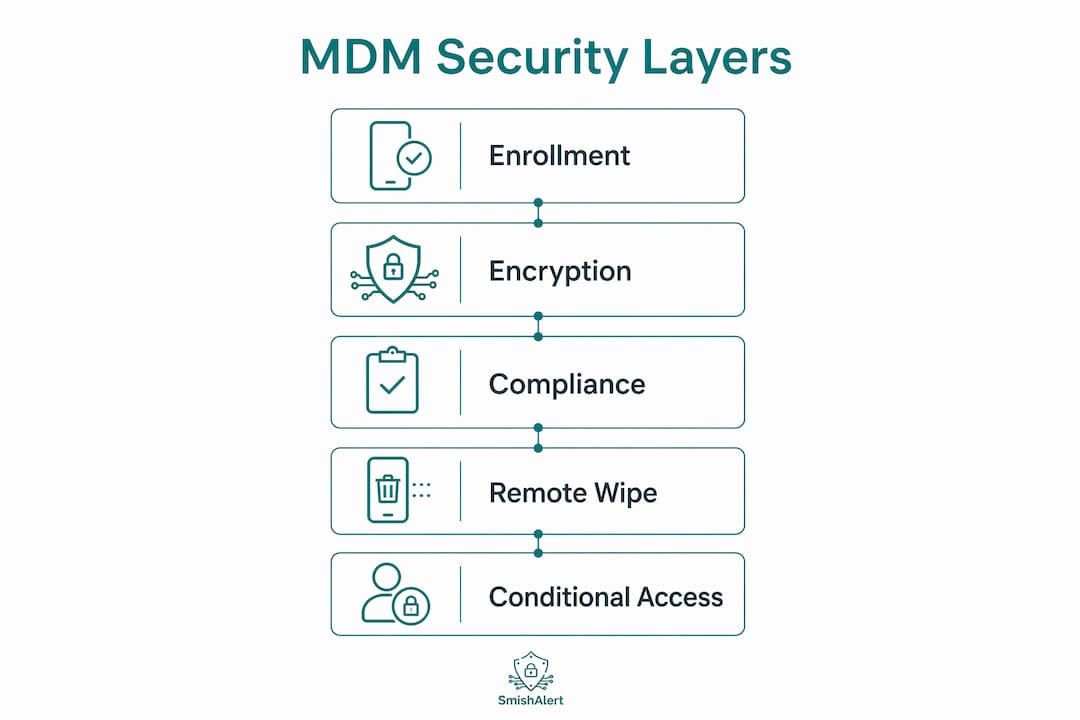
Mobile Device Management is the organizational control layer that makes encryption policies enforceable across a distributed workforce. Without MDM enrollment, a remote worker’s device operates outside the corporate security perimeter, and IT teams have no visibility into its configuration, installed apps, or threat status.
All remote worker devices must be enrolled in an MDM platform to enforce the policies that protect corporate messaging. This applies to both company-issued hardware and BYOD (bring your own device) endpoints. The enrollment process allows IT to push configurations, monitor compliance, and respond to incidents without requiring physical access to the device.
The four MDM policies that directly protect messaging security are:
- Full-disk encryption — enforces encryption at the storage level so that data is unreadable if a device is lost or stolen, regardless of whether the messaging app itself is encrypted
- PIN and biometric locks — prevents unauthorized physical access to the device and to any messaging apps running on it
- Endpoint Detection and Response (EDR) installation — EDR aids threat detection regardless of device location or network, catching malware that could intercept messages before encryption is applied
- Remote wipe and device lock — allows IT to erase or lock a device immediately after a loss or theft report, preventing data extraction from corporate messaging threads
Conditional access is the enforcement mechanism that ties these policies together. A device that fails a compliance check, for example because its OS is out of date or EDR is disabled, gets blocked from accessing corporate network resources until it meets the required standard.
| MDM Policy | Threat Addressed | Remote Worker Impact |
|---|---|---|
| Full-disk encryption | Physical device theft | Data unreadable without credentials |
| PIN/biometric lock | Unauthorized physical access | Blocks casual access to messaging apps |
| EDR installation | Malware and spyware | Detects threats before message interception |
| Remote wipe | Lost or stolen device | Erases corporate messaging data instantly |
| Conditional access | Non-compliant endpoints | Blocks network access until device is secured |
Pro Tip: For BYOD environments, use MDM work profiles rather than full device management. This gives IT control over the corporate partition without accessing personal photos, messages, or apps, which increases worker acceptance of enrollment.
Protecting BYOD devices from smishing requires this layered approach because personal devices carry personal apps that IT cannot control at the application level. MDM bridges that gap by operating at the OS level.
Why does containerization matter beyond app-level encryption?
Containerization addresses a threat that neither encryption nor MDM fully solves: the risk that a legitimate, trusted app on the same device reads or copies data from a corporate messaging session. True device security requires OS-level containerization because application-level encryption cannot defend against local threats like clipboard hijacking or screen capture.
The attack surface on a personal device is larger than most workers realize. Keyboard loggers can record every character typed into a messaging app before the message is encrypted. Screen scrapers can capture the content of a conversation as it displays. Clipboard interception can grab copied text, including passwords or authentication codes, before the user pastes them into a secure field. None of these attacks require breaking the encryption protocol itself.
A containerized OS environment, or an MDM-managed work profile on Android or iOS, creates a hard boundary between corporate and personal data. Apps running inside the work profile cannot read clipboard content from apps running outside it. Screenshots taken within the container are blocked or watermarked. Corporate messaging data cannot be backed up to a personal cloud account.
The security benefits of containerization for remote messaging include:
- Isolation of corporate messaging apps from personal apps that may have excessive permissions
- Prevention of data leakage through shared clipboard, screenshots, or cross-app data sharing
- Enforcement of data loss prevention (DLP) policies that block forwarding of corporate messages to personal accounts
- Ability to wipe only the corporate container without touching personal data, which is critical for BYOD acceptance
E2EE messaging must be supplemented with DLP rules enforced by MDM to block workflows that can leak sensitive data from corporate work profiles to personal applications. Containerization is the technical mechanism that makes those DLP rules enforceable. Understanding why mobile messaging is a security blind spot for IT teams starts here: most visibility tools stop at the app layer and miss everything happening at the OS level.
What user and organizational practices strengthen messaging device security?
Technical controls fail when users work around them. The human layer is where smishing attacks succeed, because they exploit trust and urgency rather than technical vulnerabilities. Closing this gap requires both individual practices and organizational policy.
Remote workers should adopt these habits as standard practice:
- Verify encryption indicators before sending sensitive content. Check for the lock icon in RCS or the app’s encryption status before sharing credentials, financial details, or internal data.
- Avoid clicking links in unsolicited messages. Smishing messages often impersonate executives, IT departments, or payroll systems. Verify the sender through a separate channel before acting.
- Enable multi-factor authentication (MFA) on all corporate accounts. Even if a credential is harvested through a smishing attack, MFA blocks the attacker from using it.
- Report suspicious messages immediately. Organizations using platforms like Smishalert can correlate reported messages across the workforce to detect coordinated smishing campaigns before they cause widespread damage.
- Isolate work devices from personal IoT devices on the home network. A compromised smart speaker or home router can expose traffic from a work device on the same network segment.
Physical security and network isolation are significant gaps in remote work security, and behavioral EDR compensates for the lack of physical controls that exist in an office environment. At home, there is no badge reader, no security camera, and no IT desk. The device is the perimeter.
Organizational policy must reinforce individual behavior. Security teams should implement just-in-time user education triggered by threat detection events, not just annual training cycles. Contextual reminders delivered at the moment a user encounters a suspicious message improve response rates without overwhelming workers with generic security awareness content. A hybrid BYOD security model that combines automated threat detection with contextual education can reach over 98% accuracy in reducing security risks on remote devices. That figure reflects what is possible when technical controls and human training work together rather than independently.
Pro Tip: Build a one-click reporting button into your corporate messaging app or mobile security platform. The easier it is to report a suspicious message, the more reports you will receive, and the faster your security team can identify a live smishing campaign.
Reviewing mobile messaging policy best practices gives security teams a structured starting point for drafting policies that cover encryption requirements, MDM enrollment mandates, and incident reporting procedures. The trending technologies shaping business security in 2026 include AI-assisted threat detection and zero-trust network access, both of which integrate with MDM and containerization frameworks to add another layer of protection for remote messaging environments.
Key Takeaways
Securing remote worker mobile messaging devices requires layered controls: encryption sets the baseline, MDM enforces device compliance, containerization blocks OS-level data leakage, and user education closes the human gap that technical tools cannot reach.
| Point | Details |
|---|---|
| Encryption is the baseline | RCS E2EE protects messages in transit but cannot prevent local device compromise or screen capture. |
| MDM enrollment is mandatory | All BYOD and company devices must be enrolled to enforce encryption, EDR, and remote wipe policies. |
| Containerization blocks OS-level leaks | Work profiles and secure containers prevent clipboard hijacking and cross-app data sharing. |
| Just-in-time training outperforms annual cycles | Contextual education triggered by threat events improves human response to smishing attacks. |
| Reporting culture accelerates detection | One-click suspicious message reporting enables security teams to correlate and stop live campaigns faster. |
The control gap most organizations still ignore
After years of watching organizations deploy encrypted messaging apps and call it done, I am convinced the biggest gap in remote mobile security is not encryption. It is the space between the app and the operating system.
Security teams spend significant budget on E2EE-capable apps, then deploy them on devices where a third-party keyboard app has permission to log every keystroke. The encryption is working perfectly. The attack is happening underneath it. Containerization solves this, but it requires MDM enrollment, and MDM enrollment requires worker trust. That trust is earned by being transparent about what IT can and cannot see on a personal device.
The organizations that get this right treat security as a usability problem first. They pick messaging apps that workers actually prefer to use, configure work profiles that do not feel intrusive, and deliver training that is specific to the threats workers are actually seeing. The ones that get it wrong mandate a secure app, provide no training, and then wonder why workers are still using personal SMS for work conversations.
The smishing threat is not going away. Attackers target messaging channels precisely because organizations have invested heavily in email security and left mobile largely unprotected. The technical controls described here are available to any organization willing to enforce them. The harder work is building the internal culture and policy structure that makes those controls stick.
— Sophie
How Smishalert helps protect remote worker messaging devices
Organizations that have deployed encryption and MDM still face a visibility problem: they can see device compliance, but they cannot see the social engineering attacks arriving through SMS, iMessage, and WhatsApp. That is the gap Smishalert is built to close.

Smishalert gives security teams the ability to capture, correlate, and report on smishing campaigns targeting remote workers across every major messaging channel. The platform’s detection capabilities surface executive impersonation attempts, credential-harvesting links, and payroll fraud messages that bypass device-level controls entirely. Security leaders can use the self-evaluation tool to assess their organization’s current readiness against messaging-based social engineering in under two minutes. For teams that want to see live campaign examples before committing to a full deployment, threat intelligence resources provide real-world attack data drawn from active smishing campaigns.
FAQ
What is a secure remote worker mobile messaging device?
A secure remote worker mobile messaging device is a smartphone or tablet enrolled in an MDM platform with E2EE messaging, full-disk encryption, EDR, and a containerized work profile enforced by organizational policy.
Does end-to-end encryption fully protect remote worker messages?
No. E2EE protects messages in transit but cannot prevent data leakage through screenshots, clipboard interception, or local device compromise. MDM and containerization are required to address those risks.
What is smishing and why does it target remote workers?
Smishing is a phishing attack delivered via SMS or mobile messaging apps. Remote workers are prime targets because their devices often mix personal and corporate messaging with limited IT visibility into threats arriving outside the corporate perimeter.
How does MDM enrollment protect messaging on BYOD devices?
MDM enrollment allows IT to enforce full-disk encryption, PIN locks, EDR installation, and remote wipe on personal devices without accessing personal data, using work profiles to separate corporate and personal environments.
How can organizations detect smishing campaigns targeting remote workers?
Organizations can detect smishing campaigns by deploying a platform like Smishalert that enables workers to report suspicious messages and correlates those reports across the workforce to identify coordinated attack patterns before they result in credential compromise.